Table of Contents
Installation Guideline
Automotive Calculator by F2
Automotive Calculator by F2 is a collection of practical automotive calculators designed for tire shops, wheel retailers, automotive parts stores, trailer businesses and vehicle enthusiasts.
The app helps customers compare tire sizes, understand wheel offset changes, check tire and wheel fitment, estimate towing capacity, calculate trailer payload and calculate gear ratios directly from your Shopify storefront.
Installation Guide
Step 1 — Install the App
Install Automotive Calculator by F2 from the Shopify App Store.
After installation, open the app from your Shopify Admin.
Step 2 — Open Your Theme
Go to:
Shopify Admin → Online Store → Themes → Customize
Select the theme where you want to display the calculator.
Step 3 — Add an App Block
Open the page or section where you want to display a calculator.
Click:
Add section / Add block → Apps
Then select the required calculator from Automotive Calculator by F2.
Each calculator is an independent Theme App Extension block.
Step 4 — Select a Calculator
The app includes:
- Tire Size Calculator
- Wheel Offset Calculator
- Tire & Wheel Fitment Calculator
- Towing Capacity Calculator
- Trailer Weight & Payload Calculator
- Gear Ratio Calculator
Step 5 — Configure the Block
After adding the calculator, use the Shopify Theme Editor to configure the available settings.
You can customize available:
- Heading
- Description
- Labels
- Units
- Default values
- Result display
- CTA
- Colors
- Typography
- Layout
- Disclaimer
- Other appearance options
Step 6 — Save & Test
Click Save and open the storefront.
Enter realistic vehicle values and verify that the calculator produces the expected results.
Calculator Block Guide
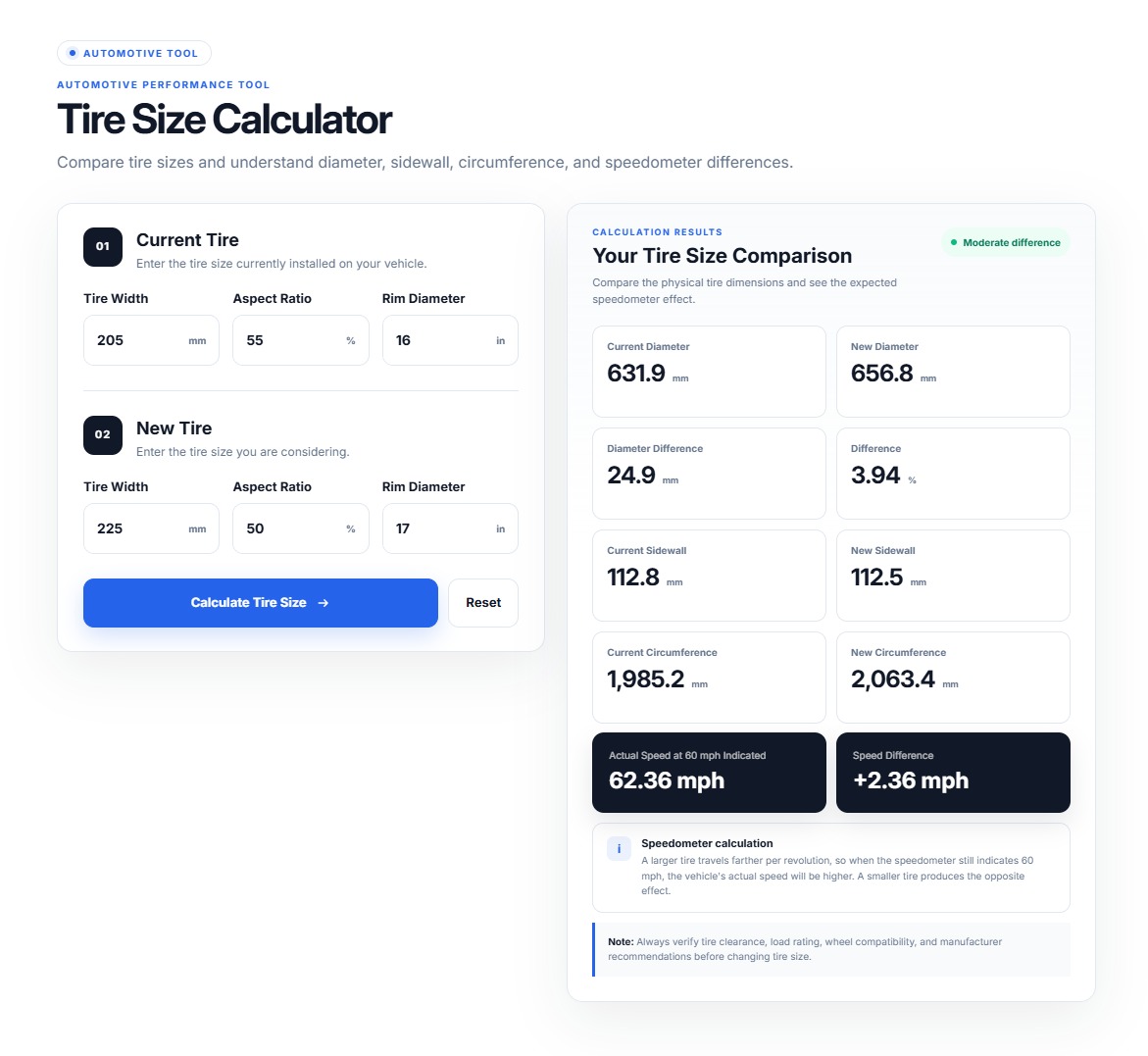
01 — Tire Size Calculator
Compare a vehicle’s current tire size with a new tire size.
Customers Can Enter
- Current tire width
- Current aspect ratio
- Current rim diameter
- New tire width
- New aspect ratio
- New rim diameter
Calculates
- Sidewall height
- Overall diameter
- Circumference
- Diameter difference
- Circumference difference
- Percentage difference
- Speedometer difference estimate
- Revolutions per distance
For example, customers can compare 225/45R18 with 235/40R19.
Best For
Tire shops, wheel stores and automotive parts retailers.
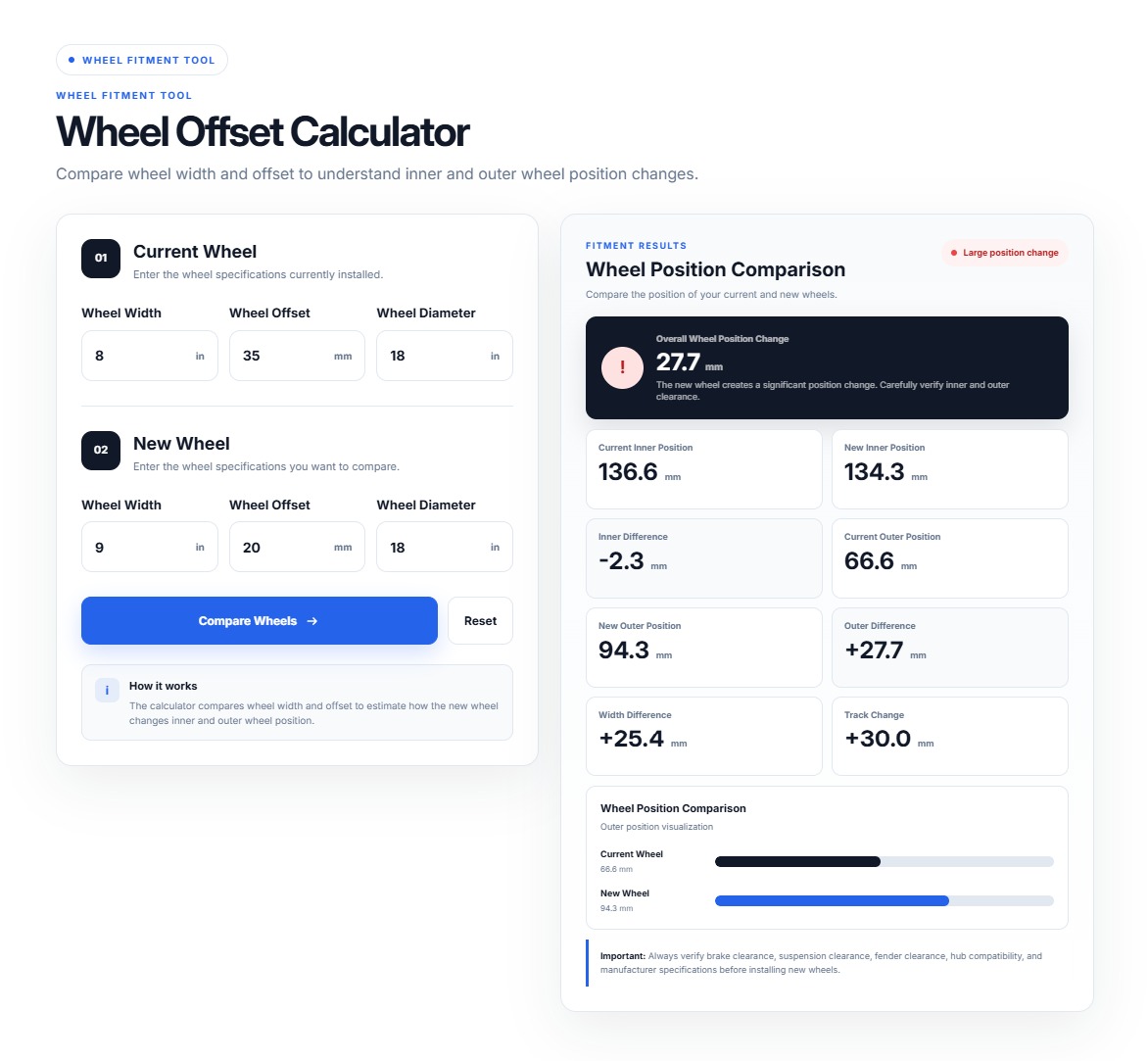
02 — Wheel Offset Calculator
The Wheel Offset Calculator helps customers understand how changing wheel width and offset can affect wheel position.
Customers Can Compare
- Current wheel width
- Current offset
- New wheel width
- New offset
Helps Estimate
- Inner position change
- Outer position change
- Wheel width difference
- Offset difference
For example:
8J ET35 → 9J ET45
can be compared to understand the resulting wheel-position change.
Best For
Wheel retailers, performance shops and custom vehicle businesses.
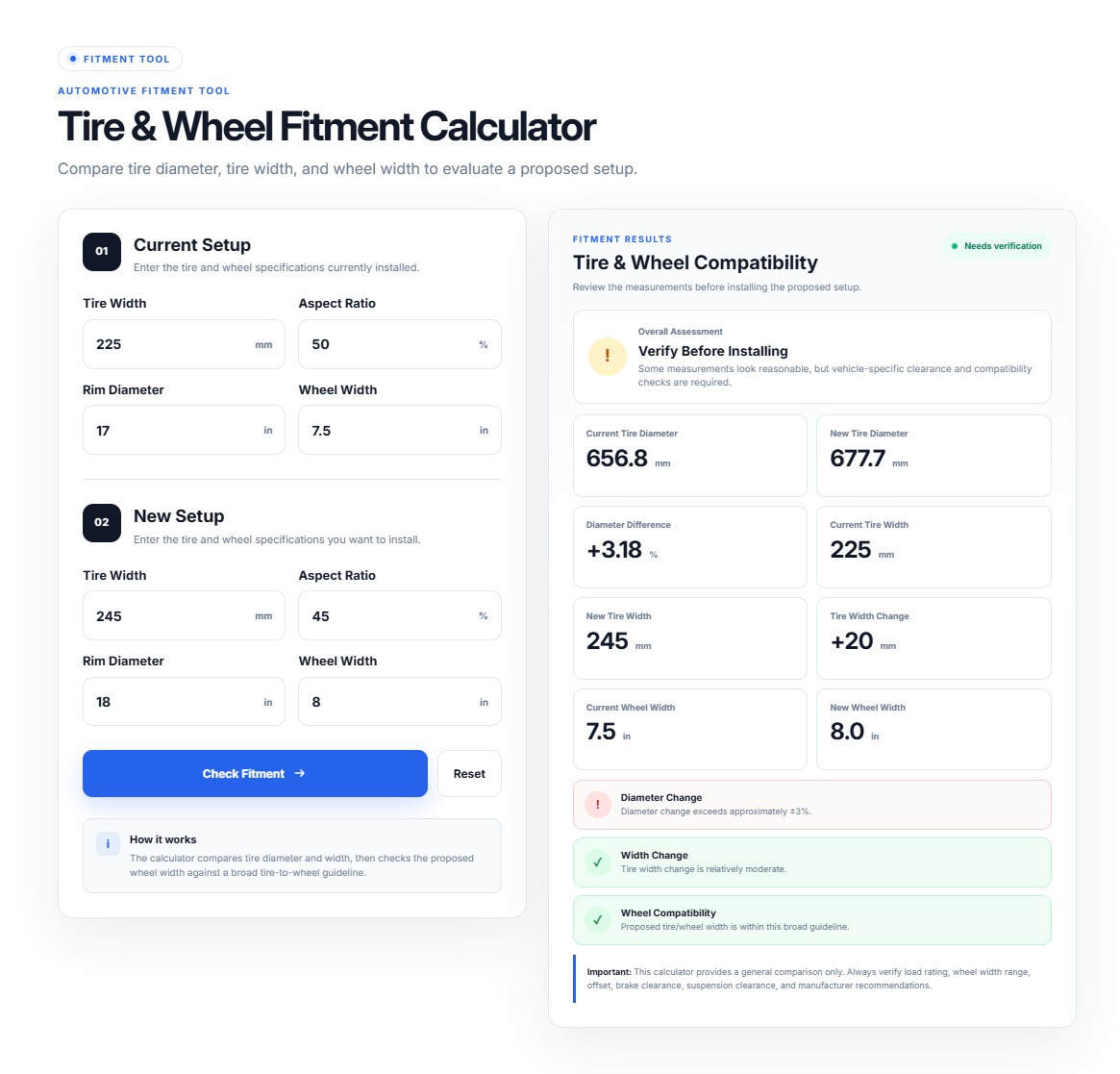
03 — Tire & Wheel Fitment Calculator
The Tire & Wheel Fitment Calculator helps customers compare tire and wheel combinations before purchasing.
Customers Can Review
- Tire width
- Aspect ratio
- Rim diameter
- Wheel width
- Offset
- Overall size relationship
Purpose
It provides an easy way to compare the selected tire/wheel combination and understand dimensional changes.
Best For
Performance shops, tire retailers and custom wheel stores.
Fitment results are estimates and should be verified against the vehicle manufacturer’s specifications and available clearance.
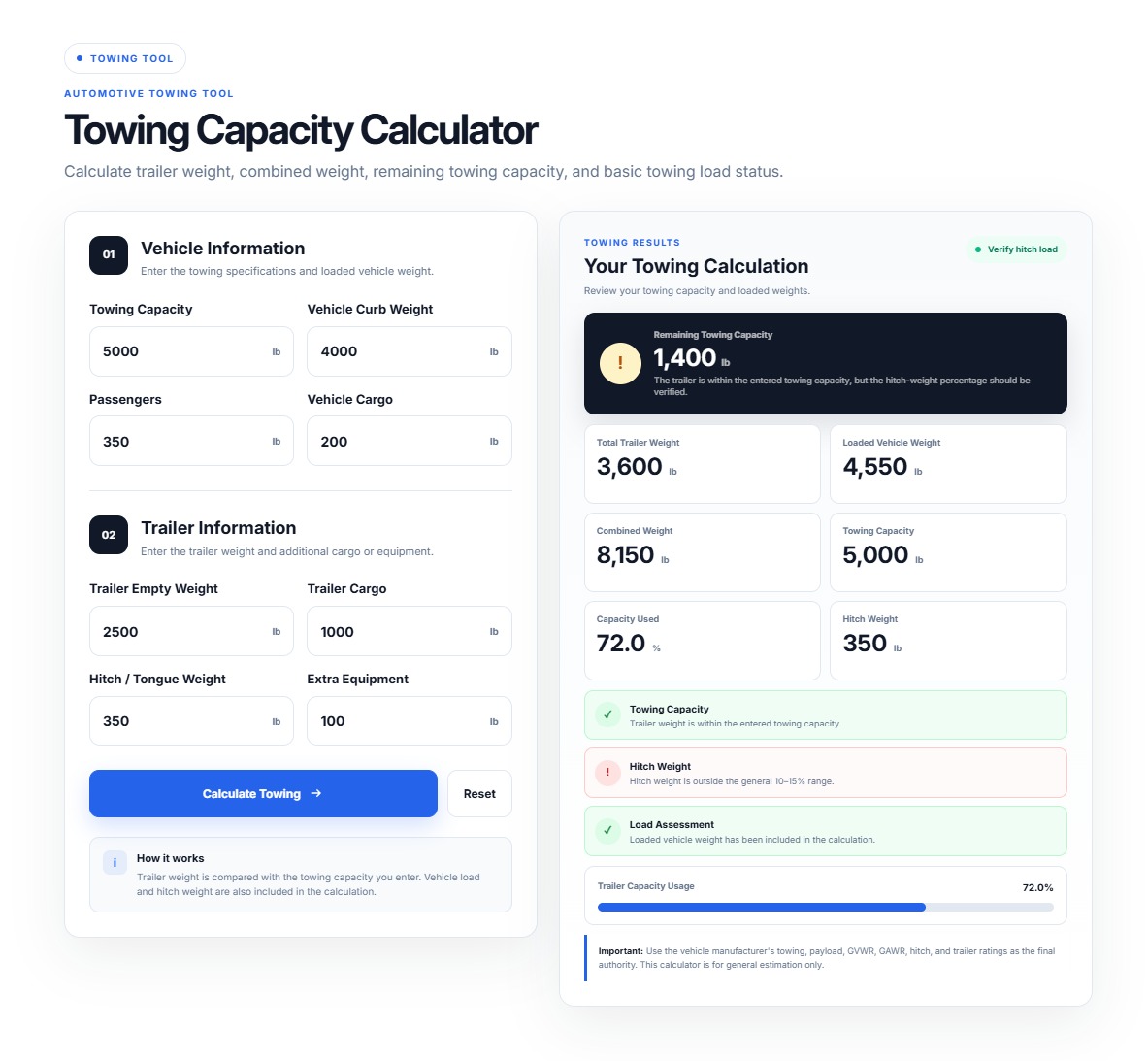
04 — Towing Capacity Calculator
The Towing Capacity Calculator helps customers estimate available towing capacity and trailer weight.
Customers Can Enter
- Vehicle towing capacity
- Vehicle GVWR
- Curb weight
- Passenger weight
- Cargo weight
- Trailer empty weight
- Trailer cargo weight
- Tongue weight percentage
Calculates
- Available towing capacity
- Total trailer weight
- Combined vehicle/trailer weight
- Payload used
- Remaining towing capacity
- Remaining payload
Status
The result can indicate:
WITHIN LIMIT
NEAR LIMIT
OVER LIMIT
The calculator is designed to provide estimates from entered values and is not presented as manufacturer-certified safety approval.
05 — Trailer Weight & Payload Calculator
This calculator helps customers estimate trailer loading and remaining payload capacity.
Customers Can Enter
- Trailer GVWR
- Trailer empty weight
- Cargo weight
- Additional equipment
- Additional passenger/load
- Hitch or tongue weight
- Unit
Calculates
- Gross Trailer Weight
- Payload Capacity
- Payload Used
- Remaining Payload
- Percentage Used
- Over-capacity status
Supported Units
- lb
- kg
The calculator includes visual status indicators such as Available, Near Limit and Over Limit.
06 — Gear Ratio Calculator
The Gear Ratio Calculator helps automotive users calculate drivetrain gearing, estimated speed and RPM.
Customers Can Enter
- Engine RPM
- Transmission gear ratio
- Final drive ratio
- Tire diameter
- Tire unit
- Vehicle speed
- Speed unit
- Gear selection where applicable
Calculates
- Gear ratio
- Overall ratio
- Estimated speed
- Estimated RPM
The core relationship uses:
Overall Ratio = Transmission Gear Ratio × Final Drive Ratio
Vehicle speed is calculated using engine RPM, tire diameter and overall ratio.
Supported Units
Speed: mph / km/h
Tire diameter: inch / mm / cm
Automotive Safety Information
For safety-related calculators such as Towing Capacity, Payload and Fitment, results should be treated as estimates.
Customers should verify:
- Manufacturer ratings
- Vehicle specifications
- Hitch rating
- Axle rating
- Tongue-weight requirements
- Tire load rating
- Wheel specifications
- Applicable regulations
The calculator should not be treated as manufacturer-certified safety approval. The project specification explicitly requires manufacturer-specification verification for these calculators.
Merchant Tips
- Use accurate vehicle/product specifications.
- Set appropriate default values.
- Select the correct measurement units.
- Place each calculator close to relevant products.
- Test calculations using known vehicle examples.
- Verify tire and wheel specifications before publishing.
- Use safety disclaimers for towing and fitment calculators.
- Use CTA buttons to guide customers toward relevant products.
- Test each calculator on mobile and desktop.
- Save and preview the theme after making changes.
Quick Installation Summary
Install App
     ↓
Online Store
     ↓
Themes
     ↓
Customize
     ↓
Add Block / Add Section
     ↓
Apps
     ↓
Automotive Calculator by F2
     ↓
Select Calculator
     ↓
Configure Settings
     ↓
Save
     ↓
Test Storefront
App Features
Automotive Calculator by F2 provides six powerful automotive calculators for Shopify stores, including tire size, wheel offset, fitment, towing capacity, trailer payload and gear ratio calculations. Help customers make more informed automotive purchasing decisions directly from your storefront.
20 Key Features
01. Tire Size Comparison
Compare current and new tire dimensions side by side.
02. Sidewall Calculation
Calculate tire sidewall height from width and aspect ratio.
03. Overall Diameter
Calculate the complete tire diameter for comparison.
04. Circumference Comparison
Compare tire circumference between two tire sizes.
05. Speedometer Estimate
Estimate the potential speedometer difference after changing tire size.
06. Wheel Offset Comparison
Compare current and new wheel offsets.
07. Inner Position Calculation
Estimate how the wheel’s inner position changes.
08. Outer Position Calculation
Estimate how the wheel’s outer position changes.
09. Tire & Wheel Fitment
Compare important tire and wheel dimensions before purchase.
10. Towing Capacity
Estimate available towing capacity from entered vehicle and trailer values.
11. Trailer Weight Calculation
Calculate total trailer weight from empty weight and cargo.
12. Payload Calculation
Estimate payload capacity and remaining payload.
13. Capacity Status
Display Available, Near Limit or Over Capacity status where applicable.
14. Gear Ratio Calculation
Calculate transmission and final-drive relationships.
15. Overall Gear Ratio
Calculate the combined transmission and final-drive ratio.
16. Speed Estimation
Estimate vehicle speed using RPM, gearing and tire diameter.
17. RPM Estimation
Reverse-calculate estimated RPM from speed and gearing.
18. Multiple Unit Support
Support appropriate automotive measurement units such as mph, km/h, lb, kg, inch, mm and cm.
19. Real-Time Calculation
Update results immediately when customers change input values.
20. Responsive Design
Provide a mobile-friendly and desktop-optimized calculator experience.
Apps Demo Screenshots
Support Helpline
If you need Support, please message us on WhatsApp. We will give you a response just in one minute. Or mail to us, Amzadhossen420360@gmail.com Or Contact