Table of Contents
Installation Guideline
F2 Order Fields & Delivery
Installation & Complete Usage Guide
F2 Order Fields & Delivery is a Shopify app designed to help merchants collect important customer and order information before checkout.
The app provides flexible fields for:
- Delivery date and time
- Custom customer information
- Company and tax information
- Order notes and special instructions
The app includes 4 main Theme App Extension blocks:
| Block | Purpose | Recommended Page |
|---|---|---|
| 1. Delivery Date & Time | Collect preferred delivery date and time | Cart Page |
| 2. Custom Order Fields | Collect additional customer/order information | Cart Page |
| 3. VAT / GST / Tax Fields | Collect business and tax information | Cart Page |
| 4. Order Notes & Instructions | Collect notes, gift messages and delivery instructions | Cart Page |
These blocks are designed to be added through Shopify’s Theme Editor rather than requiring merchants to manually edit theme code.
1. Installing the App
After installing F2 Order Fields & Delivery:
Step 1
Go to:
Shopify Admin → Apps → F2 Order Fields & Delivery
Step 2
Open:
Online Store → Themes → Customize
Step 3
Select the theme where you want to use the app.
Step 4
Open the page where you want to add the app block.
For most features in this app, select the:
Cart Page
Step 5
Click:
Add block → Apps
Step 6
Select:
F2 Order Fields & Delivery
Step 7
Choose the required block.
You will see:
- Delivery Date & Time
- Custom Order Fields
- VAT GST Tax Fields
- Notes & Instructions
Step 8
Configure the block settings.
Step 9
Click:
Save
Shopify’s official workflow is to navigate to the desired page/section, choose Add block, select the app block from Apps, configure it, and save. The exact availability depends on whether the theme section supports app blocks.
2. Block 1 — Delivery Date & Time
What does this block do?
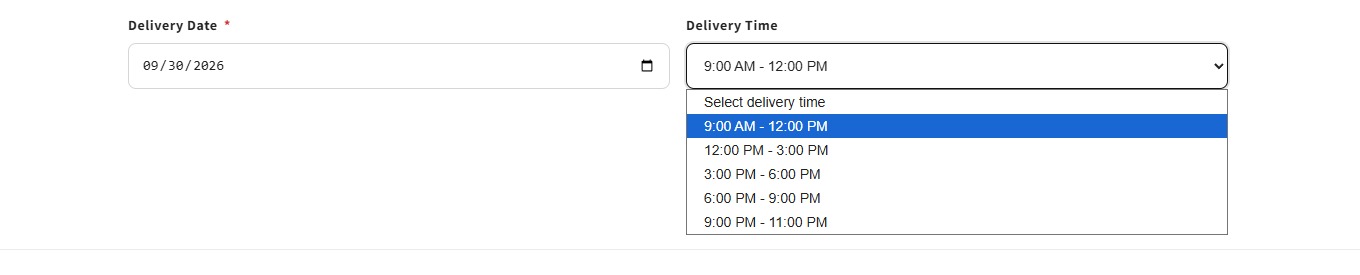
The Delivery Date & Time block allows customers to provide their preferred delivery date and/or delivery time before completing their order.
It is useful for stores where delivery scheduling is important.
For example:
Delivery Date

[ September 15, 2026 ]

Delivery Time

[ 10:00 AM - 12:00 PM ]
The merchant can configure the block according to the store’s delivery requirements.
Why should merchants use it?
Many stores need to know when customers want their orders delivered.
For example:
Grocery Store
Customer chooses:
Delivery Date:
September 15

Delivery Time:
6:00 PM - 8:00 PM
Bakery
Customer chooses:
Delivery Date:
September 20

Delivery Time:
Morning
Flower Store
Customer can select the date for a birthday or anniversary delivery.
Local Delivery Store
Customers can specify their preferred delivery schedule.
Block 1 Features
Delivery Date
Allow customers to select their preferred delivery date.
Delivery Time
Allow customers to select a delivery time or time slot.
Required Date
Merchants can make delivery date selection mandatory.
Required Time
Merchants can require customers to select a delivery time.
Date Restrictions
Merchants can control which dates customers can select according to the available settings.
Custom Labels
Merchants can customize labels such as:
Delivery Date
Delivery Time
Custom Placeholders
Merchants can provide customer-friendly placeholder text.
Example:
Select your preferred delivery dateValidation
The block can validate required delivery information before the customer continues.
Where should Block 1 be used?
Recommended Page:
Cart Page
Recommended location:
Cart Items
     ↓
Delivery Date & Time
     ↓
Cart Summary
     ↓
Checkout
Example:
--------------------------------
Your Cart
--------------------------------

Product A              $30
Product B              $25

--------------------------------

Delivery Date

[ September 15 ]

Delivery Time

[ 10:00 AM - 12:00 PM ]

--------------------------------

Subtotal: $55

[ Checkout ]
--------------------------------
Best for
- Grocery stores
- Bakery stores
- Flower shops
- Food delivery
- Local delivery
- Gift stores
- Custom delivery businesses
- Furniture delivery
- Appointment-based delivery
- Same-day delivery stores
3. Block 2 — Custom Order Fields
What does this block do?
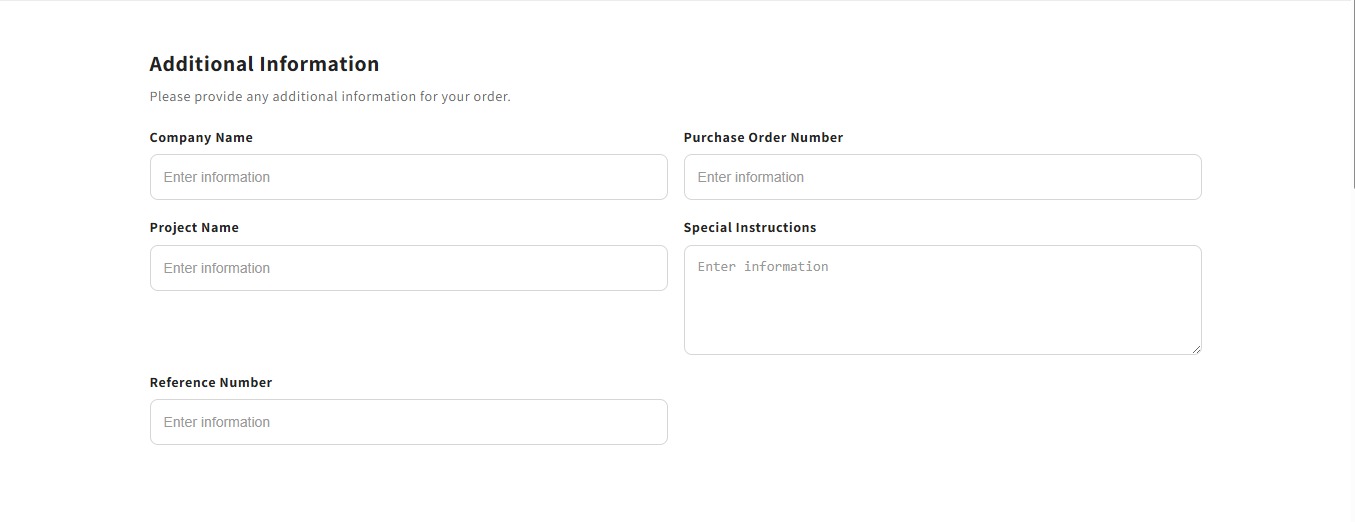
The Custom Order Fields block allows merchants to collect additional information from customers that Shopify’s standard cart fields may not provide.
For example:
Company Name
[ Enter information ]

Purchase Order Number
[ Enter information ]

Project Name
[ Enter information ]

Special Instructions
[ Enter information ]

Reference Number
[ Enter information ]
This makes the app useful for both B2C and B2B stores.
Why should merchants use it?
Different businesses need different customer information.
For example, a B2B customer may need to provide:
Company Name
Purchase Order Number
Reference Number
A custom-product store may need:
Project Name
Design Reference
Special Instructions
A service business may need:
Customer Reference
Project Details
Additional Information
Instead of modifying the theme code, merchants can configure the fields from the Theme Editor.
Theme App Extensions are specifically designed to allow merchants to configure app blocks visually without manually editing Liquid theme code.
Block 2 Features
Custom Text Fields
Collect normal text information.
Example:
Company Name
[ ABC Company ]
Number Fields
Collect numeric information.
Example:
Purchase Order Number
[ 10245 ]
Email Fields
Collect customer email information.
Phone Fields
Collect phone/contact information.
Date Fields
Allow customers to provide a date.
Textarea Fields
Useful for longer information.
Example:
Special Instructions

[ Please leave the package at the front door... ]
Checkbox Fields
Useful for confirmations and agreements.
Required Fields
Merchants can make specific fields mandatory.
Optional Fields
Fields can remain optional when the merchant does not want to force customers to provide information.
Character Counter
A character counter can help customers understand how much information they have entered.
Where should Block 2 be used?
Recommended Page:
Cart Page
Recommended structure:
Cart Items
     ↓
Custom Order Fields
     ↓
Cart Summary
     ↓
Checkout
Example:
--------------------------------

Your Cart

Product A                 $100

--------------------------------

Additional Information

Company Name
[ ABC Company ]

Purchase Order Number
[ PO-10245 ]

Project Name
[ Website Project ]

Special Instructions
[ Please contact me before delivery ]

--------------------------------

Subtotal: $100

[ Checkout ]

--------------------------------
Best for
- B2B stores
- Wholesale stores
- Custom product stores
- Corporate orders
- Service businesses
- Printing businesses
- Manufacturing businesses
- Personalized products
- Business customers
4. Block 3 — VAT / GST / Tax Fields
What does this block do?
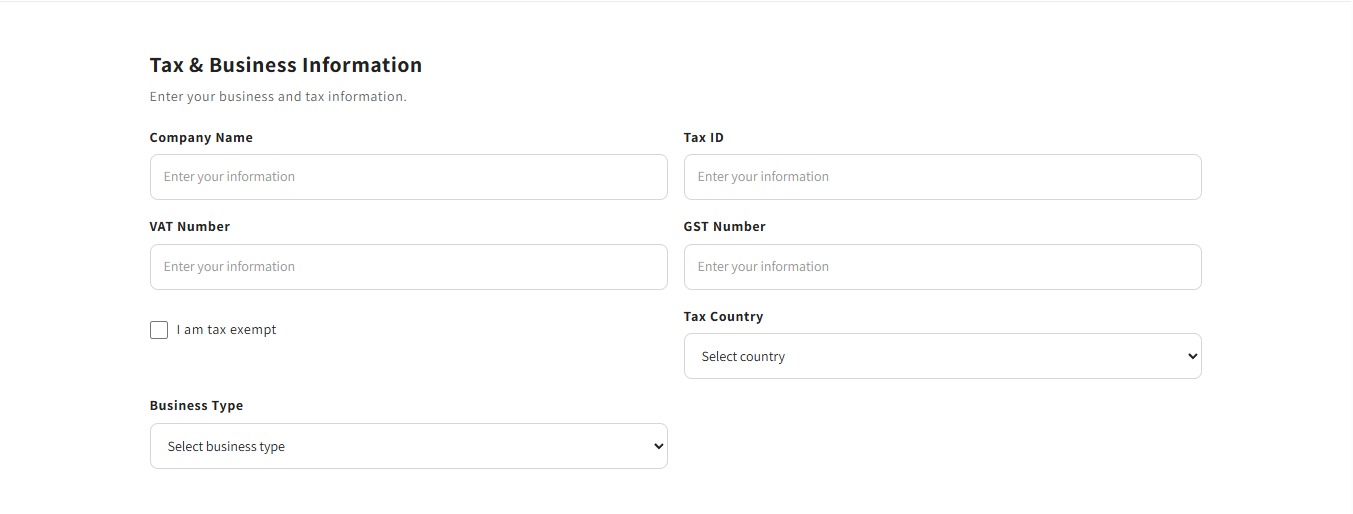
The VAT / GST / Tax Fields block allows merchants to collect business and tax-related information from customers.
It can collect information such as:
- Company Name
- Tax ID
- VAT Number
- GST Number
- Tax Country
- Business Type
- Tax Exemption information
Example:
Tax & Business Information

Company Name
[ ABC Company ]

Tax ID
[ 123456 ]

VAT Number
[ GB123456789 ]

GST Number
[ GST123456 ]

Tax Country
[ United Kingdom ]

Business Type
[ Business ]

☐ I am tax exempt
Why should merchants use it?
Business customers often need to provide tax information when placing an order.
For example, a B2B customer may need:
Company Name
VAT Number
Tax ID
Business Type
Tax Country
This information can then be collected as order information/attributes for the merchant’s order workflow.
Block 3 Features
Company Name
Collect the customer’s company/business name.
Tax ID
Collect a general tax identification number.
VAT Number
Collect VAT information.
GST Number
Collect GST information.
Tax Country
Allow customers to specify their tax country.
Business Type
Allow customers to select a business type such as:
Business
Individual
Non Profit
Government
Reseller
Wholesale
Tax Exemption
Allow customers to indicate that they are tax exempt when applicable.
Required Tax Fields
Merchants can make important tax fields mandatory.
Custom Tax Labels
For example:
Tax ID
VAT Number
GST Number
can be customized according to the merchant’s needs.
Validation
The block provides storefront-side validation for configured required/format fields.
Important: this should not be described as official government VAT/GST verification. Actual government/tax-authority verification would require an appropriate external verification service or API.
Where should Block 3 be used?
Recommended Page:
Cart Page
Recommended structure:
Cart Items
     ↓
VAT / GST / Tax Information
     ↓
Cart Summary
     ↓
Checkout
Example:
--------------------------------

Your Cart

Product A                 $250

--------------------------------

Tax & Business Information

Company Name
[ ABC Ltd ]

Tax ID
[ 123456 ]

VAT Number
[ GB123456789 ]

Tax Country
[ United Kingdom ]

Business Type
[ Business ]

--------------------------------

Subtotal: $250

[ Checkout ]

--------------------------------
Best for
- B2B stores
- Wholesale stores
- Corporate stores
- International stores
- VAT-registered businesses
- GST-based businesses
- Reseller stores
- Business suppliers
5. Block 4 — Order Notes & Instructions
What does this block do?
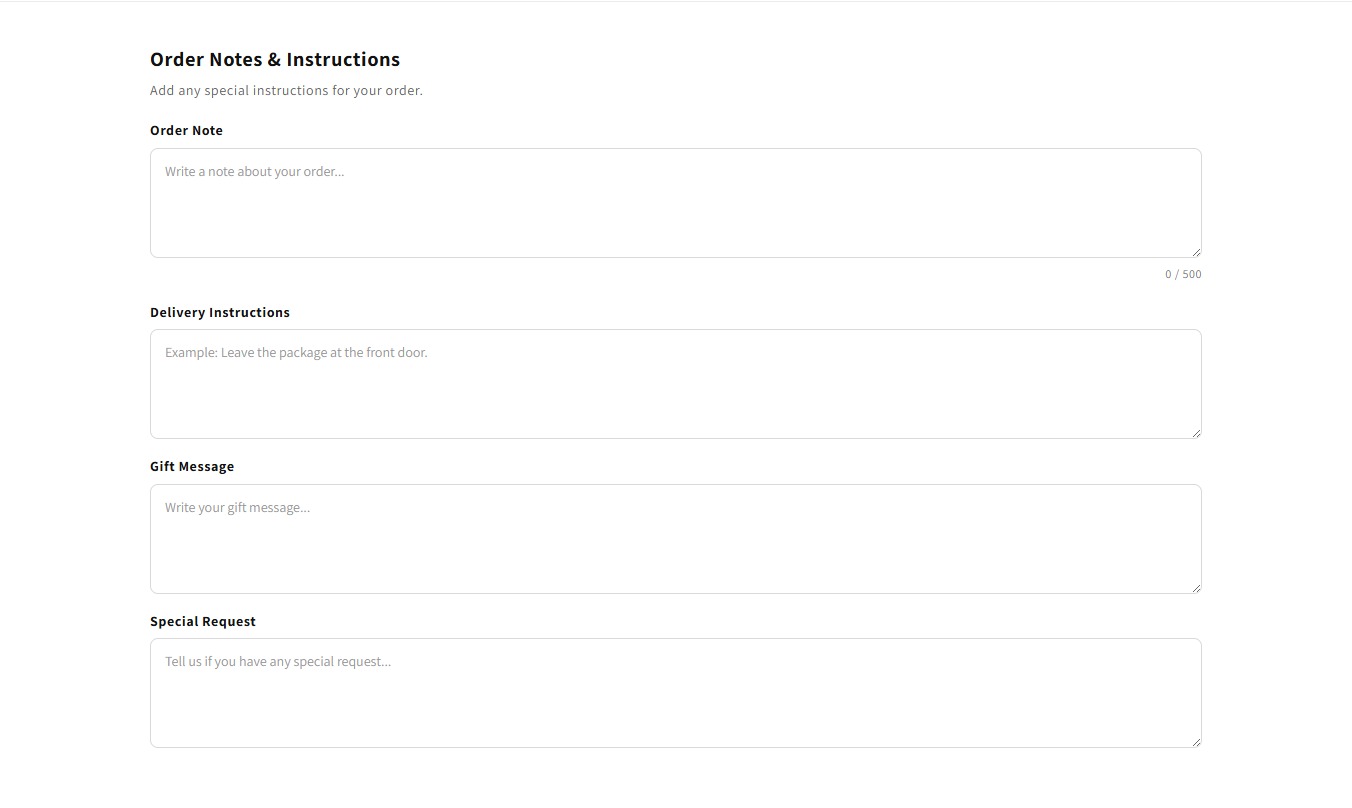
The Order Notes & Instructions block allows customers to provide additional instructions related to their order.
It can be used for:
- Order notes
- Delivery instructions
- Gift messages
- Special requests
Example:
Order Notes & Instructions

Order Note

[ Please check the product before shipping. ]

Delivery Instructions

[ Leave the package at the front door. ]

Gift Message

[ Happy Birthday! ]

Special Request

[ Please call before delivery. ]
Why should merchants use it?
Customers often need to communicate information that cannot be captured through standard product options.
For example:
Delivery Request
Please leave the package at the front door.Gift Message
Happy Birthday!Special Request
Please call before delivery.Order Note
Please pack all products together.Block 4 Features
Order Note
Allow customers to add a general note to their order.
Delivery Instructions
Collect delivery-specific instructions.
Gift Message
Useful for gift orders.
Special Request
Allow customers to communicate special requirements.
Custom Labels
Merchants can customize the labels displayed to customers.
Custom Placeholders
Example:
Write a note about your order...Required Fields
Merchants can make selected note fields mandatory.
Character Limit
Set a maximum character limit where applicable.
Character Counter
Display the number of characters entered by the customer.
Privacy Text
Merchants can optionally display an informational privacy message.
Where should Block 4 be used?
Recommended Page:
Cart Page
Recommended location:
Cart Items
     ↓
Order Notes & Instructions
     ↓
Cart Summary
     ↓
Checkout
Example:
--------------------------------

Your Cart

Product A                 $50

--------------------------------

Order Notes & Instructions

Order Note
[ Write a note about your order... ]

Delivery Instructions
[ Leave package at the front door. ]

Gift Message
[ Happy Birthday! ]

--------------------------------

Subtotal: $50

[ Checkout ]

--------------------------------
6. Block 1 vs Block 2 vs Block 3 vs Block 4
Each block has a different purpose.
Block 1 — Delivery Date & Time
Focus:
Collect delivery scheduling information.
Use when the merchant needs to know when the customer wants delivery.
Block 2 — Custom Order Fields
Focus:
Collect custom customer/order information.
Use when the merchant needs additional business-specific information.
Block 3 — VAT / GST / Tax Fields
Focus:
Collect business and tax information.
Use when customers need to provide VAT, GST, Tax ID, company or business details.
Block 4 — Order Notes & Instructions
Focus:
Collect customer notes and special instructions.
Use when customers need to communicate delivery requests, gift messages or special requirements.
7. Recommended Cart Page Setup
For a store using all four blocks:
--------------------------------
             CART
--------------------------------

Cart Products

Product A
Product B

--------------------------------

1. Delivery Date & Time

Delivery Date
[ Select Date ]

Delivery Time
[ Select Time ]

--------------------------------

2. Custom Order Fields

Company Name
[ ABC Company ]

Purchase Order Number
[ PO-10245 ]

--------------------------------

3. VAT / GST / Tax Fields

VAT Number
[ GB123456789 ]

Tax Country
[ United Kingdom ]

Business Type
[ Business ]

--------------------------------

4. Order Notes & Instructions

Order Note
[ Your instructions... ]

Delivery Instructions
[ Your delivery request... ]

--------------------------------

Subtotal

$250

[ CHECKOUT ]

--------------------------------
This creates a complete order information collection workflow before checkout.
8. Recommended Store Setup
B2C Store
Recommended:
Block 1 + Block 4
Example:
Delivery Date & Time
        ↓
Order Notes
        ↓
Checkout
Good for:
- Food
- Bakery
- Gifts
- Flowers
- Local delivery
B2B Store
Recommended:
Block 2 + Block 3 + Block 4
Example:
Company Information
        ↓
Tax Information
        ↓
Purchase Order / Special Instructions
        ↓
Checkout
Wholesale Store
Recommended:
Block 2 + Block 3
Collect:
- Company name
- Tax ID
- VAT/GST
- Purchase order
- Business type
Gift Store
Recommended:
Block 1 + Block 4
Example:
Delivery Date
      ↓
Gift Message
      ↓
Delivery Instructions
      ↓
Checkout
Local Delivery Store
Recommended:
Block 1 + Block 4
Example:
Delivery Date
      ↓
Delivery Time
      ↓
Delivery Instructions
      ↓
Checkout
9. Page-by-Page Recommendation
| Page | Block | Recommendation |
|---|---|---|
| Home Page | Block 1 | ❌ Not recommended |
| Home Page | Block 2 | ❌ Not recommended |
| Home Page | Block 3 | ❌ Not recommended |
| Home Page | Block 4 | ❌ Not recommended |
| Product Page | Block 1 | Optional |
| Product Page | Block 2 | Optional |
| Product Page | Block 3 | Optional |
| Product Page | Block 4 | Optional |
| Cart Page | Block 1 | ⭐⭐⭐⭐⭐ |
| Cart Page | Block 2 | ⭐⭐⭐⭐⭐ |
| Cart Page | Block 3 | ⭐⭐⭐⭐⭐ |
| Cart Page | Block 4 | ⭐⭐⭐⭐⭐ |
| Checkout | Theme App Blocks | Generally not applicable |
Cart Page is the primary recommended location for all four blocks.
App blocks can only be added where the theme supports app blocks; Shopify notes that some sections may not support them.
10. Complete Customer Flow
A store using all major features can have this experience:
                 PRODUCT PAGE
                      │
                      ↓
                  Add to Cart
                      │
                      ↓
                   CART PAGE
                      │
          ┌───────────┼───────────┐
          ↓           ↓           ↓
      Delivery    Custom       Tax &
       Date        Fields      Business
          │           │           │
          └───────────┼───────────┘
                      ↓
              Notes & Instructions
                      │
                      ↓
                 Cart Summary
                      │
                      ↓
                   CHECKOUT
11. Installation Checklist
After installing the app:
Theme Setup
- Open Shopify Admin
- Go to Online Store
- Open Themes
- Click Customize
- Select the Cart page
- Click Add block
- Open Apps
- Select F2 Order Fields & Delivery
- Add the required block
- Configure the settings
- Save the theme
Shopify’s official documentation confirms that app blocks can be added, repositioned and customized from the Theme Editor.
12. Testing Checklist
After configuration, merchants should test every block.
Delivery Date & Time
- Date picker
- Time picker
- Required date
- Required time
- Date restrictions
- Validation
- Mobile layout
Custom Order Fields
- Text field
- Number field
- Email field
- Phone field
- Textarea
- Checkbox
- Required fields
- Character counter
- Validation
- Order information saving
VAT / GST / Tax
- Company Name
- Tax ID
- VAT Number
- GST Number
- Tax Country
- Business Type
- Tax Exemption
- Required fields
- Validation
- Order information saving
Order Notes
- Order Note
- Delivery Instructions
- Gift Message
- Special Request
- Required fields
- Character limit
- Character counter
- Validation
- Order information saving
13. Quick Summary
Block 1 — Delivery Date & Time
Schedule delivery.
Use it to allow customers to provide their preferred delivery date and time.
Block 2 — Custom Order Fields
Collect extra information.
Use it to collect company details, PO numbers, project information, references, and other custom data.
Block 3 — VAT / GST / Tax Fields
Collect business & tax information.
Use it for VAT, GST, Tax ID, company, country and business information.
Block 4 — Order Notes & Instructions
Collect customer instructions.
Use it for order notes, delivery instructions, gift messages and special requests.
App Features
F2 Order Fields & Delivery — 4 Blocks & 20 Features
F2 Order Fields & Delivery is a flexible Shopify app that allows merchants to collect additional order information, delivery preferences, tax details, notes, and customer instructions directly from their store.
1. Delivery Date & Time
Short Description:
Allow customers to select their preferred delivery date and time before placing an order.
20 Key Features
- Delivery Date Picker
- Delivery Time Picker
- Minimum Delivery Date
- Maximum Delivery Date
- Date Format Control
- Time Format Control
- Disable Specific Dates
- Weekend Delivery Control
- Custom Delivery Label
- Custom Date Placeholder
- Custom Time Placeholder
- Required Date Selection
- Required Time Selection
- Delivery Time Slots
- Custom Validation Message
- Delivery Information Text
- Custom Primary Color
- Custom Background Color
- Custom Text Size
- Responsive Mobile Design
Recommended Page: Cart Page
2. Custom Order Fields
Short Description:
Collect additional customer and order information using customizable fields.
20 Key Features
- Multiple Custom Fields
- Text Field
- Number Field
- Email Field
- Phone Field
- Textarea Field
- Dropdown Field
- Checkbox Field
- Radio Button Field
- Custom Field Labels
- Custom Placeholders
- Required Field Option
- Optional Field Option
- Character Counter
- Custom Validation Messages
- Order Attribute Support
- Custom Field Names
- Custom Background Color
- Custom Text Size
- Responsive Layout
Recommended Page: Cart Page
3. VAT / GST / Tax Fields
Short Description:
Collect business, tax, VAT, GST, and company information from customers during checkout preparation.
20 Key Features
- Company Name Field
- Tax ID Field
- VAT Number Field
- GST Number Field
- Tax Country Selection
- Business Type Selection
- Tax Exemption Checkbox
- Required Company Name
- Required Tax ID
- Required VAT Number
- Required GST Number
- Required Tax Country
- Required Business Type
- Custom Tax ID Label
- Custom Exemption Label
- Tax Number Validation
- Custom Error Messages
- Custom Background Color
- Custom Text Size
- Responsive Design
Recommended Page: Cart Page
4. Order Notes & Instructions
Short Description:
Let customers provide special order notes, gift messages, delivery instructions, and other important information.
20 Key Features
- Order Notes Field
- Delivery Instructions
- Gift Message
- Custom Note Labels
- Custom Placeholders
- Required Order Note
- Required Delivery Instructions
- Required Gift Message
- Character Limit
- Character Counter
- Multiple Text Areas
- Custom Validation Messages
- Customer Instructions
- Special Request Support
- Gift Order Support
- Delivery Request Support
- Custom Background Color
- Custom Text Size
- Custom Border Radius
- Responsive Mobile Layout
Recommended Page: Cart Page
Quick Summary
| Block | Best Page | Main Purpose |
|---|---|---|
| Delivery Date & Time | Cart | Collect delivery preferences |
| Custom Order Fields | Cart | Collect extra customer information |
| VAT / GST / Tax Fields | Cart | Collect business & tax information |
| Order Notes & Instructions | Cart | Collect notes and special instructions |
One-Line App Description
Collect delivery preferences, custom order information, tax details, and customer instructions with flexible Shopify cart fields.
Apps Demo Screenshots
Support Helpline
If you need Support, please message us on WhatsApp. We will give you a response just in one minute. Or mail to us, Amzadhossen420360@gmail.com Or Contact